Coding Agents Need Better Inputs
 Jetson
Jetson automatically finds bugs and feature requests hiding in your support inbox.
Try it freeCoding agents got good fast. GitHub Copilot can pick up a GitHub issue, read your codebase, write a fix, run the tests, and open a PR. Devin can do the same from a Slack message. Claude Code works through multi-file changes that would take a developer an afternoon.
The bottleneck is no longer writing the fix. It’s knowing what to fix, and giving the agent enough context to fix it correctly.
The Input Problem
Here’s a GitHub issue that a human wrote:
Title: Checkout broken
Description: A customer reported that checkout isn’t working. Can someone look into this?
A developer would look at this and ask a dozen follow-up questions. What browser? What steps led to it? Does it happen every time? Is it one customer or many? What does “broken” mean exactly?
A coding agent doesn’t ask follow-up questions. It takes the issue at face value, greps the codebase for anything related to “checkout,” and starts guessing. Maybe it finds something. Usually it doesn’t, or it fixes the wrong thing.
Now here’s the same issue with proper context:
Title: Checkout button unresponsive on Safari (iOS)
Description: 7 customers reported that the checkout button does nothing when tapped on Safari/iOS. Desktop Safari works fine. Chrome on iOS works fine. Customers report that the page loads normally but tapping “Complete Purchase” has no response. No error in the customer’s view.
Customer quotes:
- “I’ve tried three times to complete my order and the checkout button does absolutely nothing when I click it. Safari on my Mac works fine but my iPhone doesn’t.”
- “Nothing happens when I tap the login button. iPhone 14, latest iOS.”
Suggested files:
src/checkout/PaymentButton.svelte,src/lib/browserDetect.tsAffected customers: 7, first reported March 2
A coding agent can work with this. The browser is specified. The behavior is described precisely. There’s a clear distinction between what works and what doesn’t (desktop Safari vs. iOS Safari, Chrome vs. Safari). The relevant files are identified. The agent can go straight to PaymentButton.svelte, look for touch event handling or Safari-specific rendering issues, and write a targeted fix.
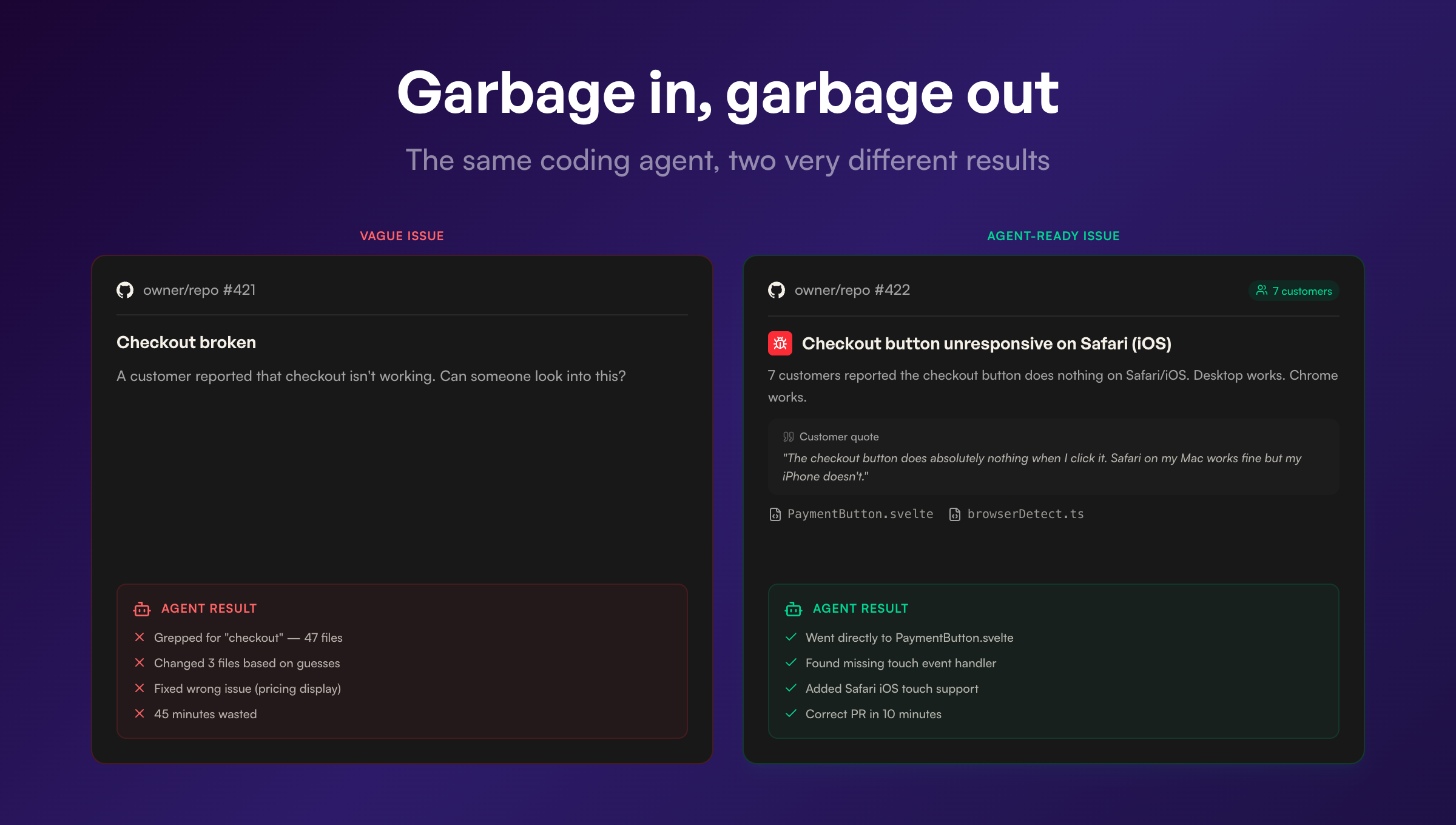
The difference between these two issues is the difference between a coding agent that wastes 45 minutes exploring dead ends and one that opens a correct PR in 10 minutes.
Support Conversations Already Contain the Spec
The frustrating thing is that the information for the second issue already existed. It was sitting in Help Scout, Zendesk, or Intercom. The customers described exactly what happened, what device they were using, what they expected, and what went wrong instead.
Support conversations are accidentally good engineering specs. Customers provide reproduction steps because they’re trying to explain their problem. They mention their browser, OS, and device because the support agent asked. They describe expected vs. actual behavior because that’s how you describe something that’s broken.
The information is there. It’s just trapped in the wrong format, spread across multiple conversations, mixed in with greetings and signatures and follow-up questions about billing.
Here’s what a typical support conversation contains that’s useful for an engineering spec:
Environment details. Customers mention their browser, device, and OS constantly. “I’m on Safari on my iPhone” or “Using Chrome on Windows” or “This happens on the mobile app but not desktop.” This is exactly the information a developer needs to reproduce the issue.
Reproduction steps. Not formatted neatly, but present. “I clicked the checkout button and nothing happened” or “I uploaded a file, then went back to the dashboard, and my file was gone.” Customers describe what they did because they’re trying to get help.
Expected vs. actual behavior. “I expected it to save my changes but instead I got a blank page” is a textbook bug report format. Customers write this naturally because it’s how you describe something that’s broken.
Severity signals. “I’ve tried three times,” “This is blocking my whole team,” “I need this before Friday.” Developers and coding agents don’t usually have access to urgency information. Support conversations are full of it.
Frequency data. When 7 customers report the same issue in different words, that’s a signal that a coding agent can’t get from a single GitHub issue. The issue isn’t intermittent or edge-case. It’s a real problem hitting real users.
The Gap Between Support and Engineering
Most teams bridge this gap manually. A support agent reads a conversation, decides it’s a bug, writes a summary in Slack or creates a GitHub issue with whatever details they remember. Context gets lost at every step. The customer said “iPhone 14, latest iOS, Safari” but the GitHub issue just says “mobile.”
Some teams don’t bridge it at all. The support agent resolves the conversation, the customer’s feedback sits in the closed ticket, and engineering never hears about it. The bug stays in production until enough customers complain loudly enough that someone escalates.
Both approaches break down as support volume grows. A team processing 30 conversations a day can manually triage. A team processing 300 cannot. The information loss scales with volume.
Structured Inputs from Unstructured Conversations
This is what Jetson does. It reads every conversation in your Help Scout, Zendesk, or Intercom inbox and extracts the structured information that engineering needs.
A conversation where a customer writes “Nothing happens when I tap the checkout button on my iPhone, Safari, latest iOS, I’ve cleared my cache and tried three times” becomes a classified bug report with the environment (Safari, iOS, iPhone), the behavior (button unresponsive on tap), the reproduction steps (tap checkout button, nothing happens), the customer quote verbatim, and a link back to the original conversation.
When multiple customers report the same issue, Jetson groups them. That single classified bug report now has 7 linked conversations, 7 customer quotes, and a clear picture of scope.
When you create a GitHub or Linear issue from Jetson, all of that context comes with it. The issue includes customer quotes, affected customer count, first-reported date, and suggested code files based on what the customers described. It’s the kind of issue that a developer can act on immediately, or that a coding agent can pick up and fix without guessing.
The Pipeline That’s Forming
The pieces of this pipeline exist independently right now. Support platforms store conversations. Jetson classifies them and creates structured issues. GitHub and Linear manage the work. Coding agents write the fixes.
The full loop looks like this: customer reports a problem in Help Scout. Jetson classifies it, groups it with similar reports, and creates a GitHub issue with full context. A coding agent picks up the issue, reads the reproduction steps and suggested files, writes a fix, and opens a PR. A developer reviews and merges. The customer gets notified that their problem is fixed.
Each step in this chain depends on the quality of the previous step. And the first transformation, from unstructured support conversation to structured engineering spec, is the one that determines whether everything downstream works or wastes time.
Coding agents are going to keep getting better at writing code. The constraint on what they can accomplish will increasingly be the quality of the issues they’re given. The best source of those issues is the people who use your product every day and tell you, in detail, when something breaks.
That information is already in your support inbox. The question is whether it stays there.
Jetson turns support conversations into engineering-ready issues — with customer quotes, reproduction context, and suggested code files. Exactly what coding agents need. Try the free audit to see what’s in your inbox.