Free Audit: See What's Hiding in Your Support Inbox
 Jetson
Jetson automatically finds bugs and feature requests hiding in your support inbox.
Try it freeMost support teams have bugs and feature requests buried in their inbox that never reach the product team. Conversations get resolved, tagged, and closed. The customer got a response, so the ticket is “done.” But the product intelligence inside that conversation — the bug that three other customers also reported, the feature request that keeps coming up — disappears.
We built a free tool that finds what you’re missing. No account, no trial, no sales call. Connect your Help Scout or Intercom account, wait two minutes, and see a full breakdown of what’s actually in your inbox.
How It Works
The whole flow takes about two minutes:
1. Enter your email and pick a platform. Go to jetson.help/audit, type your work email, and click either Help Scout or Intercom.
2. Authorize read-only access. You’ll be redirected to your platform’s OAuth screen. Jetson requests read-only access — we can see conversations, but we can’t modify, delete, or send anything on your behalf.
3. Select a mailbox (Help Scout only). If you have multiple Help Scout mailboxes, pick the one you want to analyze. Intercom users skip this step since each workspace is treated as a single source.
4. Wait while Jetson analyzes. Jetson pulls your most recent 50 conversations and classifies each one using AI. You’ll see a progress bar as conversations are processed — it typically takes 1-2 minutes depending on conversation length.
5. See your results. Once analysis is complete, you get a full report right in the browser.
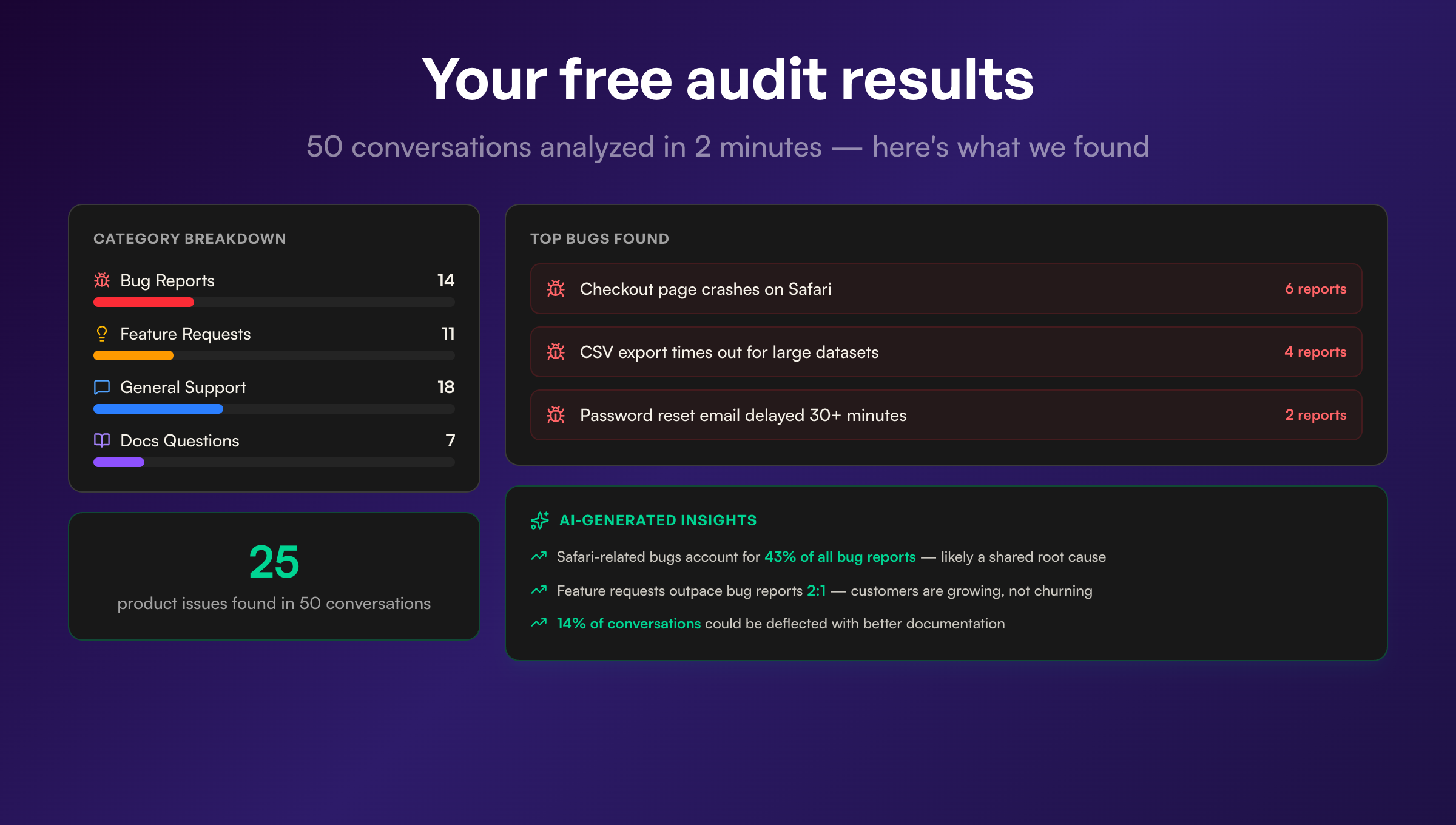
What the Report Shows
The audit report breaks your conversations into several sections:
Bugs Found
Every conversation classified as a bug report, grouped by topic. If five customers all reported the same checkout issue in different words, they’ll appear as a single bug with a count of 5. Each bug shows:
- Topic name — a generated label describing the issue
- Count — how many conversations mention it
- Severity — high, medium, or low, based on frequency
- Source conversations — links back to the original conversations in Help Scout or Intercom, so you can verify
Feature Requests
Same structure as bugs, but for feature requests. Grouped by topic, ranked by frequency, with links to the original conversations.
Category Breakdown
A visual bar chart showing what percentage of your conversations fall into each category: bug reports, feature requests, general support, documentation questions, and more. This gives you an immediate sense of how much product signal is hiding in your support volume.
AI-Generated Insights
This is where it gets interesting. Jetson looks at the patterns across all 50 conversations and generates specific insights. Things like:
- “Login page crashes account for 30% of all bug reports”
- “Feature requests outpace bug reports 2:1”
- “45% of conversations are general support questions that could be deflected with better documentation”
- “5 unique bugs were each reported only once — investigate for edge cases”
These patterns are hard to spot when you’re handling tickets one at a time. Seeing them grouped gives you a completely different view of what’s happening.
Sharing Your Report
Every audit report gets a unique URL. Send it to your PM, your engineering lead, or paste it in Slack. Anyone with the link can view the report — no login required.
This is intentional. The value of an audit isn’t just for the person who ran it. It’s for the product manager who needs to see that one bug is driving 30% of support volume, or the engineering lead who didn’t know that customers keep asking for the same feature.
What Happens to Your Data
Security matters, especially when you’re granting access to your support inbox. Here’s exactly what happens:
- Read-only OAuth access. Jetson can read conversations. It cannot send messages, modify tickets, or change any settings in your account.
- Token encryption. Your OAuth access tokens are encrypted with AES-256-GCM before being stored. They’re never saved in plaintext.
- 30-day expiration. Audit sessions and their associated tokens are automatically deleted after 30 days.
- No conversation storage. We don’t persist your original conversation data in our database. We store the classification results (bug/feature/support categories) but not the raw messages.
- Rate limiting. Each IP address gets 3 free audits per day to prevent abuse. The rate limiter uses hashed IPs with a daily rotating salt, so we don’t store your actual IP address.
You can revoke Jetson’s access at any time from your Help Scout or Intercom account settings.
Why We Built This
We had a selfish reason: we wanted people to experience what Jetson does before committing to a subscription. It’s hard to explain “we automatically find bugs and feature requests in your support conversations” in a way that clicks. But when someone sees their own data — their own inbox — classified and grouped, they get it immediately.
The audit tool is the fastest way to see whether Jetson would be useful for your team. If the report surfaces three bugs you didn’t know about and a feature request that 8 customers mentioned, the value is obvious. If your inbox is mostly general support with very few bugs, maybe you don’t need Jetson right now — and that’s fine too.
From Audit to Full Account
If you like what you see in the audit, starting a full Jetson account is straightforward. Click “Start Free Trial” on your results page, and your email is pre-filled from the audit. The onboarding flow picks up where the audit left off — you don’t need to re-authorize or re-import.
With a full account, Jetson analyzes conversations continuously via webhooks, groups issues over time, tracks customer impact, and integrates with GitHub and Linear for creating issues directly from bug reports.
Try It
Head to jetson.help/audit. Two minutes from now, you’ll know what your support team has been sitting on.